Codex for Building Websites: What It Did on 33 Businesses
 By Ryan Shaw. Published . 5 min read.
Key takeaways
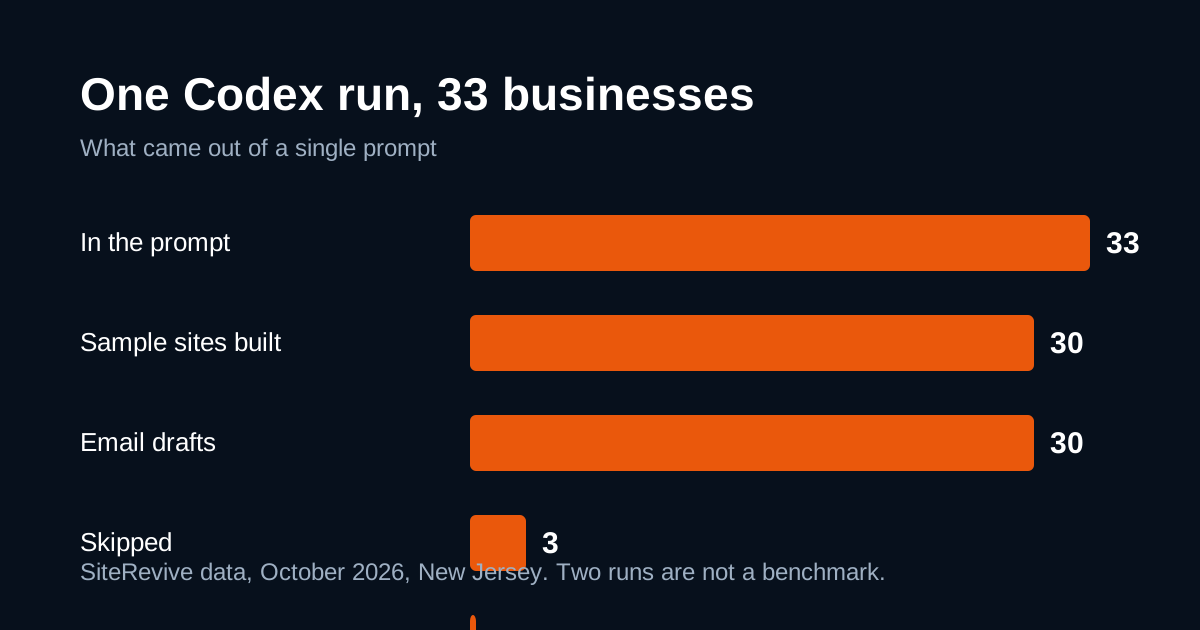
- In one prompt, Codex built 30 sample sites and 30 email drafts for 33 New Jersey businesses and skipped 3 whose sites would not download.
- It sent no email and published no site, because the prompt said drafts only.
- It picked 127 real photos from the businesses' own sites and used none for the 3 businesses with no usable photos.
- A person still has to check each business on a map, read each draft and open each page on a phone.
- We did not measure time, cost or quality against other agents. These are counts from one run, not a benchmark.
On this page
We gave OpenAI's Codex one prompt with 33 New Jersey businesses in it. It built 30 sample websites and wrote 30 email drafts. It skipped 3 businesses whose sites would not download. It sent no email and published no site, because we told it to stop at drafts. This post shows the counts, what the run needed from a person, and how to set up a batch of your own. All figures are SiteRevive data, October 2026.
If you want the side-by-side view of Codex, Claude and ChatGPT, read ChatGPT, Claude or Codex for building client websites. This post goes deeper on one tool and one run.
What we asked Codex to do
The job was the same one we give any AI agent. Each business in the prompt came with its name, town, phone, Google rating and a list of website problems SiteRevive had found. For each business the agent had to:
- Open the business's own website and read the facts on it.
- Pick real photos from that site.
- Build a one-page sample site that fits a phone.
- Check its own work against a written self-check.
- Write a short email draft with a link to the sample.
- Log what it did, and skip the business with a reason if it could not finish.
The prompt said what not to do. No invented reviews, prices, awards or staff names. No stock or AI images of the business. No sending and no publishing. The prompt also asks for a noindex rule on each page so search engines leave them out. You can read the thinking behind these rules in our prompt template post.
The counts
Two runs, both with the same kind of prompt (SiteRevive data, October 2026, New Jersey).
| Result | Run 1 | Run 2 |
|---|---|---|
| Businesses in the prompt | 4 | 33 |
| Finished sample sites | 4 | 30 |
| Email drafts written | 4 | 30 |
| Emails sent | 0 | 0 |
| Sites published | 0 | 0 |
| Skipped | 0 | 3 |
For the 33 business run, more detail:
| Check | Count |
|---|---|
| Real photos picked from the businesses' own sites | 127 |
| Businesses built with no photos (too few usable ones) | 3 |
| Sites that passed the prompt's 22-point self-check | 30 |
| Sites with sideways scroll at 375 px or 1280 px wide | 0 |
| Drafts flagged "maps not checked" | 30 |
Three of the four businesses in run 1 also had fewer than 3 usable photos. In both runs the agent built a clean design without photos instead of filling the gap with images that were not theirs.
What went well
Three things stood out.
It stopped when it should. When a business website refused the download or timed out, Codex logged the reason and moved on. Those 3 skips are the honest answer. A guess would have been worse.
It followed the photo rule. Our rule is simple: fewer than 3 good photos means no photos. The agent followed it for the businesses that fell short, and it picked photos from each business's own site for the rest.
It stayed inside the line on actions. It wrote drafts and files, and it did nothing outside that.
What a person still had to do
The 30 "maps not checked" flags matter most. The agent could not confirm that each business on the Google Maps listing was the same business at the same address. That check stays human. Before any email goes out, open each listing and match the name, the address and the phone.
Here is the review list I would use after any batch. It is my opinion, built on what the run showed.
- Open every sample on a real phone. A clean log is not the same as a good page.
- Match the phone number, address and hours to the Google listing.
- Read each photo choice. A photo can come from the right site and still show the wrong thing.
- Read every email draft. Check that it names one real problem and has one link.
- Confirm the noindex rule is on the page, and that the page is not linked from anywhere public.
- Check the business is open and the email address was found on its own website.
That is about the same review we describe in our post on fair sample sites.
How to set up your own batch
OpenAI's Codex documentation is the place to start, because the apps and options change often. A few things to settle before you paste a long prompt:
- Turn on web access for the run. The job needs the agent to read each business's website. OpenAI's Codex CLI docs describe live web search as an opt-in setting.
- Work in a folder you can inspect. Put each business in its own subfolder so you can open pages one by one.
- Say drafts only. State plainly: do not send, do not publish.
- Start small. We ran 4 businesses before 33. A bad habit in a prompt is cheap to find on 4 and expensive on 33.
- Keep a log file. Ask for one line per business: built, skipped, or built with a flag, and why.
SiteRevive builds this prompt for you. You tick the leads you want in Manage Leads and press Copy prompt. It includes each business's facts and the rules above. You paste it into your own AI. It does not promise replies or sales, and its servers never send email.
What we did not test
- Time. We did not time the runs, so we make no speed claim.
- Cost. We did not price the runs or compare plans.
- Quality scores against other agents. We have not scored Codex against Claude on the same businesses. Claude is the agent our prompt is tested with.
- ChatGPT chat. We did not run the prompt in plain ChatGPT.
- Results after sending. Nothing was sent, so we have no reply data and will not guess.
Two New Jersey runs are not enough to rank tools. They are enough to learn where the work lands on you.
When Codex is a fit
Codex suits you if you already pay for ChatGPT and want an agent that works on files on your own computer. If you prefer to start with the agent our prompt is tested with, see building websites with Claude for clients. For the rest of the one-person stack, see the tools a website agency needs.
Plans for the lead and prompt side start at $97 a month, with a 7-day money-back guarantee, no questions asked. See the SiteRevive pricing page. The AI plan is paid separately, to the AI company you choose.
Questions people ask
Can Codex build a website?
Yes. OpenAI describes Codex as an agent that can read files, edit them and run commands on your computer. In our October 2026 run it wrote the page files for 30 small business sample sites from one prompt. A person still checked the results.
Does Codex need web search turned on to build a site for a real business?
For this job, yes. The agent has to read the business's own website to get facts and photos. OpenAI's Codex CLI docs describe live web search as something you switch on for a run, so check your setting before a batch.
Did Codex send the emails in your test?
No. The run was set to drafts only. Codex wrote 30 email drafts and sent none. We recommend keeping a person between the draft and the send.
Is this a benchmark of Codex?
No. It is two runs on New Jersey businesses with one prompt. We did not time it, price it or score it against other tools. Use the counts to plan your own review, not to rank agents.
Sources
- OpenAI Codex documentation, read October 21, 2026.
- Block search indexing with noindex (Google Search Central), read October 21, 2026.
Ryan Shaw
Ryan Shaw makes SiteRevive. He ran a marketing agency for 15 years and worked with 100+ agency clients. He has generated $100M+ in online sales, most of it through agency clients, and has helped 15,000+ marketers with software, courses and coaching.
Earnings disclaimer. SiteRevive and this article do not promise income, sales or replies. What you earn, if anything, depends on your work, your market and your offer. Results vary and some people earn nothing.