ChatGPT vs Claude vs Codex for Building Client Websites: What We Tested
 By Ryan Shaw. Published . 7 min read.
Key takeaways
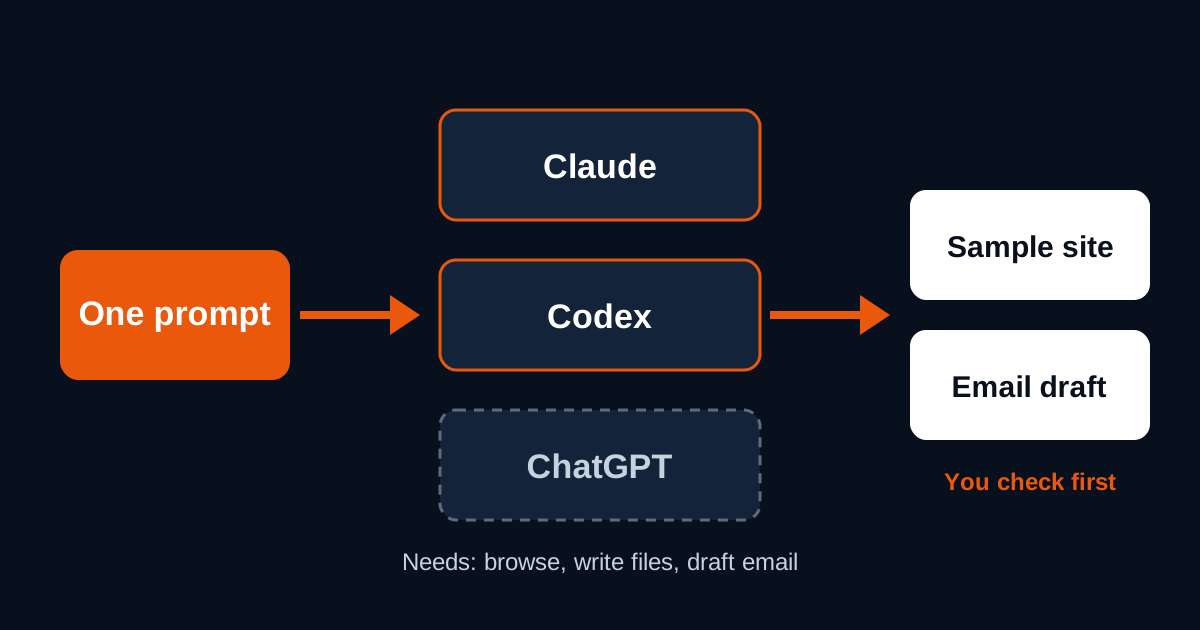
- Pick the tool by what it can do, not by its name. For client sites it must browse the web, write files and draft email.
- In our October 2026 test, Codex took 33 New Jersey businesses in one prompt and finished 30 sample sites and 30 email drafts. Nothing was sent.
- Claude is the AI we test SiteRevive's prompt with. We have not run that prompt in ChatGPT, so we do not rate it here.
- Every tool needs a person at the end. In our run, all 30 drafts still needed a human to confirm the Google Maps listing.
On this page
ChatGPT vs Claude for building websites is the wrong fight if you build sites for local businesses. Both can write a clean one-page site. What decides the job is the setup around the model. Can it open the business's own website? Can it save the photos and the page as files? Can it draft an email to the owner? Claude Code and Codex can do all three on your own computer. ChatGPT now has its own website feature too, but we have not run our prompt there. Below is what we tested, what we did not, and how to choose.
What a client website job asks of an AI
A one-page sample site for a plumber or a diner is not hard code. It is a list of small chores done in the right order:
- Open the business's own website and its Google listing.
- Copy the true facts: name, phone, address, hours, services.
- Save a few real photos from the business's own site.
- Write one HTML page that works on a phone.
- Check the page against a list.
- Write a short email to the owner and save it as a draft.
Any good model can do step 4. Steps 1, 3 and 6 need tools. The model has to browse, write files and reach your email. So the real question is which product gives the model those hands.
Here is how the three line up, from their own documentation as read on October 21, 2026.
| What the job needs | Claude Code | Codex | ChatGPT (chat and Sites) |
|---|---|---|---|
| Read and edit files on your computer | Yes, per Anthropic's docs | Yes, per OpenAI's Codex CLI docs | Not in plain chat |
| Run commands (resize photos, check the page) | Yes | Yes | Not in plain chat |
| Open web pages | Yes, through its web and Chrome tools | Opt-in live web search, per the CLI docs | Yes, in chat |
| Host a site for you | No, you host it | No, you host it | Sites, in public beta, per OpenAI's help page |
| Draft email | Through connected tools (MCP), per its docs | Through plugins, per its docs | Not checked for this article |
| Tested with our prompt | Yes, it is the one we test with | Yes, two runs in October 2026 | No |
Plans and limits change often. Check the current plan pages for Claude and ChatGPT before you pay for anything.
What we actually tested
SiteRevive writes a prompt for each list of businesses. You paste it into your own AI. The AI builds one sample site per business from that business's own public facts and photos, then drafts a short email. Claude is the AI we test that prompt with. In October 2026 we also ran it in Codex on New Jersey leads, to see how a second agent handles the same job.
Codex, run 1: four businesses
The first run had 4 New Jersey businesses. Codex built 4 local sample sites and wrote 4 email drafts. It sent nothing and published nothing.
Three of the four businesses had fewer than 3 usable photos on their own sites. Codex did not fill the gap with stock or made-up images. It gave those three a design with no photos. That is the behavior you want. A sample that shows someone else's kitchen is worse than one with no kitchen at all.
Codex, run 2: 33 businesses in one prompt
The second run had 33 businesses in a single prompt. Here is the count, SiteRevive data, October 2026:
| Result | Count |
|---|---|
| Businesses in the prompt | 33 |
| Finished sample sites | 30 |
| Email drafts written | 30 |
| Emails sent | 0 |
| Sites published | 0 |
| Skipped (site blocked downloads or timed out) | 3 |
| Real photos picked from the businesses' own sites | 127 |
| Sites with no usable photos | 3 |
| Sites that passed the prompt's 22-point self-check | 30 |
| Sites with sideways scroll at 375px or 1280px wide | 0 |
| Drafts marked "maps not checked" | 30 |
Two lines in that table matter more than the rest.
The 3 skips are honest failures. When a business website refused the download, Codex stopped and said so. It did not guess.
The 30 "maps not checked" flags mean a person still has to open each Google Maps listing and confirm it is the same business at the same address before any email goes out. The agent did the heavy work. The final check stayed human.
Claude: the one we test with
Our prompt is written and tested against Claude first. One example: a sample restaurant site, built with Claude Code from the restaurant's own public photos, as a pitch. We do not name the restaurant, because it is not a customer. The photos were its own food and dining room, taken from its own website, and the page was never published.
ChatGPT: not tested by us
We have not run SiteRevive's prompt in ChatGPT for this article, so we will not rate it. What we can say comes from OpenAI's own pages. Codex now lives inside the ChatGPT family, with a desktop app, a CLI, an IDE extension and a cloud version. OpenAI's help center also describes Sites, a public beta that builds a website from a prompt and gives you a private preview. Treat those as OpenAI's claims until you test them on your own job.
How to choose for client work
My opinion, after 15 years running a marketing agency: pick the tool whose weak spot you can live with. Then build a checking habit around it.
Pick Claude Code if
- You want the tool our prompt is tested with.
- You are fine with a desktop app or a terminal window.
- You want the agent to read the business's site, save photos, write the page and check it in one pass.
Anthropic's docs describe Claude Code as a tool that reads files, edits them, runs commands and works with your other tools. Most ways to use it need a paid Claude plan. If you are deciding between Claude plans, see Claude Pro or Max for building websites.
Pick Codex if
- You already pay for ChatGPT and want an agent that works on your own files.
- You want a second agent to compare against.
OpenAI's Codex CLI page says it can inspect files, make edits and run the tools on your machine. Live web search is something you switch on for a run. Remember that, because the job needs the web.
Pick ChatGPT chat or Sites if
- You want to draft page copy, research a trade, or try a quick hosted page.
- You are not yet building pages for many businesses at once.
The tradeoff: a site hosted inside someone else's product may not be the file you want to hand to a client later. Ask where the file lives and how you move it to the owner's own domain. Our guide to handing over a website to a client covers the move.
Tradeoffs nobody puts in the headline
| Tradeoff | What it means for you |
|---|---|
| Setup | Claude Code and Codex install on your computer. Chat tools do not. |
| Web access | Some agents need web search turned on. A site built without the web is built from guesses. |
| Many businesses at once | Long prompts can stop part way. Our run 2 finished 30 of 33 and said why it skipped 3. |
| Photos | The agent can only use photos it can download. Some sites block it. |
| Final check | No tool checked the Google Maps listing for us. A person did. |
| Cost | Plans change. Check the plan pages, not a blog post. |
The parts that matter more than the model
Across our runs, the same three things decided quality. None of them was the brand of the model.
First, the prompt. A vague prompt makes every model invent details. A strict one tells it to leave a gap empty instead of guessing. Our guide to a prompt to build a website with AI gives you a clean template you can paste into any of these tools.
Second, the photos. Real photos from the business's own site beat any generated image for a pitch, because the owner recognises them. We explain why in real photos vs AI images on small business websites.
Third, the check. In our run, the agent passed its own 22-point list on 30 sites. A person still had to confirm 30 Maps listings. Plan for that time.
If you want the full path from first lead to first site, start with how to start a website agency with AI. For a Claude-only walkthrough, see build websites with Claude for clients. And if you are weighing a drag-and-drop builder instead, read AI website builder for agencies.
Where SiteRevive fits
SiteRevive does the part before the AI. It finds local U.S. businesses with old or missing websites. It checks each site and writes down the real problems. It keeps an email only when it finds one on the business's own website. Then it writes the prompt for your AI. Your AI builds the sample site and drafts the email, from your own email account. SiteRevive's servers never send email.
It does not promise replies, calls or sales. Plans start at $97 a month, with a 7-day money-back guarantee, no questions asked. You can see the three plans on the SiteRevive pricing page.
A short test you can run this week
You do not need to trust our table. Run your own.
- Pick one real local business with an old website.
- Paste the same prompt into two tools.
- Open both pages on your phone.
- Count the facts on each page you can confirm on the business's own site.
- Count the facts you cannot confirm. Each one is a problem.
- Read both email drafts out loud. Keep the one you would send under your own name.
The tool with fewer invented facts wins. In my experience that matters more to an owner than a nicer font.
For the full counts from the 33-business Codex run and a review list for your own batch, read Codex for building websites.
Questions people ask
Is ChatGPT or Claude better for building websites?
For a one-page site for a local business, both can write the code. The bigger question is the setup around the model: can it open the business's website, save files and draft an email. Claude Code and Codex both read files, edit them and run commands on your computer, per their own docs.
Can Codex build a website for a client?
Yes. In our October 2026 test, Codex ran one prompt on 33 New Jersey businesses and finished 30 sample sites with 30 email drafts. Three were skipped because the business site blocked downloads or timed out. None were sent.
Do I need to know how to code to use these tools?
No, but you need to read the result. Open the sample site on a phone, check every fact against the business's own pages and read the email before it goes anywhere. The tool writes the code. You own the checking.
Which AI does SiteRevive work with?
Any AI agent that can browse, write files and use email. Claude is the one we test with. Codex also ran our prompt in October 2026. We have not tested it in ChatGPT.
Sources
- Claude Code overview, Anthropic docs, read October 21, 2026.
- Codex docs overview, ChatGPT Learn, read October 21, 2026.
- Codex CLI, ChatGPT Learn, read October 21, 2026.
- Creating and managing Sites, OpenAI Help Center, read October 21, 2026.
- Claude plans and pricing, read October 21, 2026.
- ChatGPT plans and pricing, read October 21, 2026.
Ryan Shaw
Ryan Shaw makes SiteRevive. He ran a marketing agency for 15 years and worked with 100+ agency clients. He has generated $100M+ in online sales, most of it through agency clients, and has helped 15,000+ marketers with software, courses and coaching.
Earnings disclaimer. SiteRevive and this article do not promise income, sales or replies. What you earn, if anything, depends on your work, your market and your offer. Results vary and some people earn nothing.