Real Photos vs AI Images on a Small Business Website
 By Ryan Shaw. Published . 8 min read.
Key takeaways
- Use the business's own photos first. Eyetracking research shows people look at real products and real staff and skip generic stock.
- AI images of a real business show things that do not exist. Google asks merchants to keep the metadata that marks an image as AI made.
- If a business has fewer than three usable photos, build a clean photo-free design instead of faking one.
- Resize to about 1600 pixels wide, strip GPS data, write plain alt text, and keep a pitch sample private until the owner says yes.
On this page
Real photos beat AI images on a business website because they show the customer what they will actually get. When you build a site for a local business, use the owner's own photos first. If there are not enough good ones, build a clean design with no photos. Do not fill the gap with AI images or stock pictures of strangers.
That is my opinion after 15 years running a marketing agency. Below is the evidence behind it, what we saw in our own builds, and the exact steps to find, prepare and use real photos.
What the research says
There is not much good research on photos and small business sales. There is a lot of vendor marketing. Here is what holds up.
People look at real things and skip filler
Nielsen Norman Group ran eyetracking studies on how people view photos on web pages. Jakob Nielsen wrote them up in "Photos as Web Content" (2010, reviewed by the firm in 2026). The finding: users pay close attention to photos that carry information, such as product shots and pictures of the real staff. They ignore generic stock images that are only there to decorate.
One example from that article: on a software company's About page, people spent more time looking at the team portraits than reading the biographies, even though the text took up far more space.
A local business site is mostly information. What does the food look like? Who is coming to my house? What does the finished roof look like? Real photos answer those questions. A smiling model from a stock library answers none of them.
Google wants AI images labelled
Google Merchant Center's image rules say that images made with generative AI must carry metadata showing they were AI made. Google names the IPTC "Digital Source Type" field and values such as TrainedAlgorithmicMedia. Google Search Central also says it may use image metadata to show how an image was made in the "About this image" feature.
That rule is for shopping listings, not every website. But it tells you where things are going. An AI image is something platforms want flagged. If a customer checks a photo of "your" kitchen and sees it was made by a model, trust drops.
Google Business Profile asks for reality
Google's own photo tips for Business Profiles say photos should be sharp, well lit, free of heavy filters, and that "the image should represent reality." The same standard makes sense for the business's website.
What I will not quote
You will find claims online that swapping stock photos for real ones lifts leads or sales by a large percentage. I could not find the study behind those numbers, and most come from photo vendors. I am not using them. The case for real photos stands on what people look at and on honesty, not on a number I cannot check.
What we saw in our own builds
SiteRevive data, October 2026. These are counts from sample sites built for pitches. None of them are results, sales or replies.
| Build | Businesses | Real photos used | Photo-free designs |
|---|---|---|---|
| Sample restaurant site (name hidden) | 1 | 14 photos from the restaurant's own public website, resized to at most 1600 px wide | 0 |
| One AI agent run, 33 New Jersey leads | 33 | 127 photos picked from the businesses' own sites | 3 businesses had no usable photos |
| One AI agent run, 4 New Jersey leads | 4 | Photos from one business | 3 businesses had fewer than 3 usable photos |
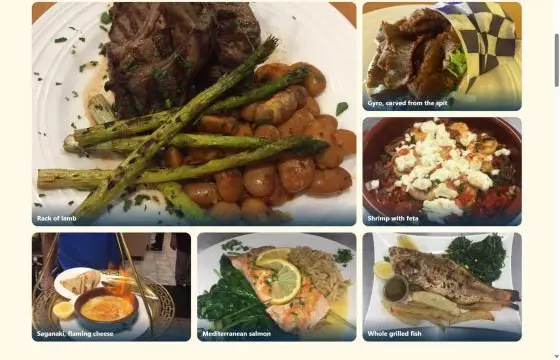
Two things stood out.
First, a lot of businesses do have good photos. They are just buried. The restaurant above had dish photos on an old site that did not fit a phone. The same photos look like a new business when they sit in a clean grid.
Second, many do not. In the small run, three of four businesses had too few usable photos. The rule we gave the AI was simple: fewer than three good photos means no photos. Those sites used color, type and the business's real facts instead. That is a better pitch than a page full of AI food that the owner never cooked.
Real photos vs AI images vs stock: side by side
| Question | Real photos from the business | AI generated images | Stock photos |
|---|---|---|---|
| Shows what the customer will get | Yes | No, it shows something that does not exist | No, it shows someone else |
| Owner recognizes it on first look | Yes | No | No |
| Risk of a customer feeling misled | Low | High | Medium |
| Same image on other sites | No | Possible | Often |
| Effort to get | Medium | Low | Low |
| Quality control | Varies, you must pick | Looks polished, can look fake | Polished, generic |
AI images do have a place. Abstract backgrounds, simple icons and drawn patterns are fine. They do not pretend to be the business. The line is this: never use an AI image where a customer would assume they are seeing the real place, product, people or work.
Where to get real photos
Work down this list in order.
- The business's own website. Old sites often hold the best photos the owner ever paid for. Look on the home, menu, gallery and about pages.
- The Google Business Profile. Use photos the owner posted. Photos posted by customers belong to those customers, so leave them out.
- The owner's social pages. Again, only what the business posted.
- Ask the owner. Once they are interested, ask for five to ten photos of their work, their team and their place.
- Take them yourself. A phone in good daylight beats any stock library. Ask first.
For a full list of what to collect from a client, see the client website content checklist.
Permission and the pitch sample
The photos belong to the business or to whoever took them. Here is how I handle that. This is my practice, not legal advice.
- A pitch sample stays private. Keep it out of search with a noindex tag and do not list it anywhere.
- Say in the email that it is a sample built from their public photos.
- If the owner asks you to take it down, take it down the same day.
- Before anything goes live, get the owner's written OK to use the photos. Ask them to confirm they own them.
- Never use customer review photos or photos from another business.
If you send a finished sample as your first contact, our guide to the cold email with a finished website shows how to word it.
How to prepare the photos
Five short steps. Do them in this order.
1. Pick fewer, better photos
Five strong photos beat twenty weak ones. Drop anything blurry, dark, tilted or with a watermark. Drop photos with customers' faces unless the owner has their consent.
2. Resize
About 1600 pixels wide is enough for a full-width photo. Small cards need far less, often 600 to 800 pixels. Squoosh, a free tool from GoogleChromeLabs, resizes and compresses in your browser, and its page says images never leave your device.
3. Strip location data
Phone photos often carry GPS coordinates. Re-saving the photo as a new JPEG or WebP with a tool that drops metadata removes them. Check one file afterwards. On Windows, right-click, Properties, Details. On a Mac, open it in Preview and use Show Inspector.
4. Keep files small
Aim for big photos under about 300 KB and small ones well under 100 KB. WebP often gives a smaller file at the same quality. Set width and height on every image so the page does not jump while it loads.
5. Write plain alt text
Describe what is in the photo, in a short sentence. "Grilled octopus with lemon on a clay plate" is good. "Best Greek food in town" is not alt text, it is an ad.
When no photo is the right answer
Some businesses have nothing usable. A one-person cleaning company may have no photos at all. A roofer may have only blurry shots from a ladder.
Do not fill that gap with AI. Build a clean page that leads with the facts the owner can stand behind:
- What they do, in plain words
- Where they work
- Their phone number, large and tappable
- Their real Google rating, if they have one, quoted exactly
- One clear button to call or ask for a quote
Then ask for photos in the first conversation. A page that says "photos coming soon" never looks good, so leave that section out until real photos arrive. Our guide on what to include on a small business homepage lists the sections that work without pictures.
Tell the AI the rule
If an AI builds your sites, put the photo rule in the prompt in plain words. Here is the block I would use:
Photos: use only photos from the business's own website or its own
Google Business Profile posts. Never generate, draw or invent photos
of the business, its food, its work or its people. If you find fewer
than 3 usable photos, build the page with no photos. Resize to at most
1600 px wide, re-save to remove location data, and write a short
alt text that says what is in each photo.
The full prompt we suggest is in the AI prompt to build a small business website. If you are still picking a tool, see ChatGPT, Claude or Codex for building client websites.
SiteRevive finds local businesses with weak websites, writes down the real problems it found, and gives your own AI a prompt that builds each sample from the business's own public facts and photos. Plans start at $97 a month, with a 7-day money-back guarantee, no questions asked. See the SiteRevive plans.
A quick checklist
- Photos come from the business, the owner or you
- No AI images standing in for the real place, product, people or work
- No customer-posted photos without consent
- Fewer than three usable photos means a photo-free design
- Each photo resized and re-saved without location data
- Width and height set on every image
- Short alt text that describes the photo
- Pitch sample kept out of search and removed on request
- Written OK from the owner before the site goes live
Once the site is live, the same honesty applies to the business's Google listing. The Google Business Profile guide for clients covers photos there too.
To see these photo rules in a real pitch, read how to sell a website to a restaurant owner.
Questions people ask
Are AI generated images bad for a small business website?
For a real place, yes in most cases. An AI image of a dish, a truck or a crew shows something the customer will not find when they arrive. Use AI images only for abstract art or icons, never to stand in for the real business.
Do stock photos hurt a local business website?
They rarely help. Eyetracking work from Nielsen Norman Group found users ignore generic stock images and look at photos of real products and real people. A stock photo also appears on many other sites.
Can I use photos from a business's website in a sample site?
The photos belong to the business or its photographer. For a private pitch sample, keep the page out of search, credit the source, and remove it the moment the owner asks. Ask for written permission before anything goes live. This is not legal advice.
What size should website photos be?
About 1600 pixels wide is enough for a full-width photo on most screens. Save as WebP or JPEG and aim for a file under about 300 KB for big photos and far less for small ones.
Sources
- Photos as Web Content (Nielsen Norman Group, Jakob Nielsen, 2010, reviewed 2026), read October 21, 2026.
- Image link [image_link] (Google Merchant Center Help), read October 21, 2026.
- Image metadata in Google Images (Google Search Central), read October 21, 2026.
- Tips to manage photos on your Business Profile (Google Business Profile Help), read October 21, 2026.
- Squoosh (GoogleChromeLabs), read October 21, 2026.
Ryan Shaw
Ryan Shaw makes SiteRevive. He ran a marketing agency for 15 years and worked with 100+ agency clients. He has generated $100M+ in online sales, most of it through agency clients, and has helped 15,000+ marketers with software, courses and coaching.
Earnings disclaimer. SiteRevive and this article do not promise income, sales or replies. What you earn, if anything, depends on your work, your market and your offer. Results vary and some people earn nothing.