7. Keep track and go again
After a few days you will have emails sent, a few replies, and some quiet. This chapter is the simple system that keeps it straight.
Manage Leads
Every business SiteRevive finds lives in Manage Leads. Open it on the left.
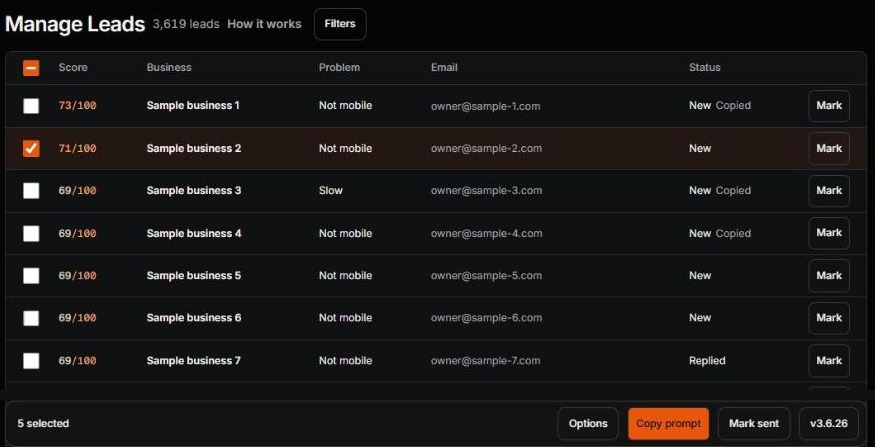
- The number. A higher number means a weaker website. It only sorts the list.
- Status. It starts at New. After you mark a business Sent, the column reads Contacted. You may also see Booked, Lost or Skipped.
- Mark. Click it to change the status. You can also mark from the business’s own page. The buttons sit in a row under the contact details.
- Mark sent. Emailed several businesses yourself? Tick them, open Mark sent at the bottom, then press Mark selected as sent. It does up to 100 at a time. SiteRevive sends nothing.
The four marks
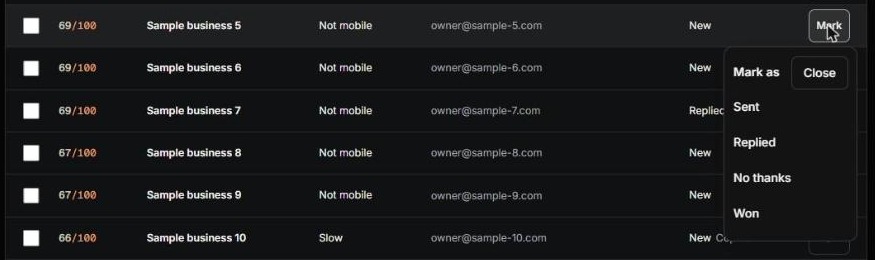
| Mark | Use it when |
|---|---|
| Sent | You sent the email from your own inbox (or your AI did). |
| Replied | The owner wrote back. |
| No thanks | They said no, or asked you to stop. |
| Won | They became your customer. |
Not every mark shows for every business. Sent only shows for a business you have not emailed yet. Replied goes away once you have marked it.
SiteRevive does not read your inbox. It only knows what you tell it. So marking is your job, and it takes ten seconds. A business marked No thanks is a business you never write to again. SiteRevive also keeps it out of your next prompt.
A faster way, when you are ready: Copy prompt
At the bottom of Manage Leads is Copy prompt. It is the same idea as the steps in chapters 3 to 6, done by your own AI for many businesses at once.
- Make sure your name, business name and mailing address are in Settings.
- Tick the businesses you have not emailed yet. Or press Select best 10.
- Click Options. Tick Save drafts only (nothing is sent). It is off at first, so tick it until you trust the results.
- Press Copy prompt. Paste it into your own AI.
For each business, your AI builds a sample site and writes the email. SiteRevive only copies text. It sends nothing. With Save drafts only ticked, your AI sends nothing either. Read every draft, as in chapter 5, and press Send yourself. The prompt leaves out anyone you already emailed and anyone marked No thanks. You can tick up to 100 at a time.
With Save drafts only left off, your AI can send from your own email. Do that only when you have read what it writes and you are happy to stand behind it.
A simple week
| When | Do this |
|---|---|
| Start of the week | Run a search for a small number. Read the reports. Pick the ones where you can see the problem. |
| Next few days | Review, fix and send your emails, a few each day. Or read the drafts your AI saved. Mark each one Sent. |
| Every day | Check your own inbox. Answer anyone who wrote back the same day. Mark them Replied or No thanks. |
| End of the week | Look at Manage Leads. Who is still quiet? Who needs one short follow-up? What would you change? |
The point is a rhythm you can keep. A small week you repeat beats a big week you never repeat.
When nothing happens
Quiet is normal. Owners are busy. Nobody can promise replies, not me and not any tool. But there are things you can check, one at a time. Change one thing, then wait a week before you judge it.
- Did you really send them? SiteRevive never sends. Look in your own Sent folder. If you used drafts only, check that you pressed Send.
- Is the problem easy to see? Can an owner check it in ten seconds? If not, pick a clearer one.
- Is the email short and plain? One problem, one question. Cut anything that sounds like an ad.
- Is it the right kind of business and place? Go back to chapter 2. Try a different pick.
- Did you follow up? One short note after a few days, with something new in it. Not more than three.
- Is your subject line plain? It should read like a note from a person.
Do not send the same email to more people to get a different result. Do not write to anyone who said no. Do not change five things at once.
Check yourself
- I know where every business I wrote to lives: Manage Leads.
- I mark each one: Sent, Replied, No thanks or Won.
- I check my inbox every day.
- I have a weekly rhythm, even a small one.