5. Check the email, then send it
SiteRevive writes the email. You read it, fix it, and send it from your own inbox. Nothing goes out until you press Send yourself.
Step 1. Open the email
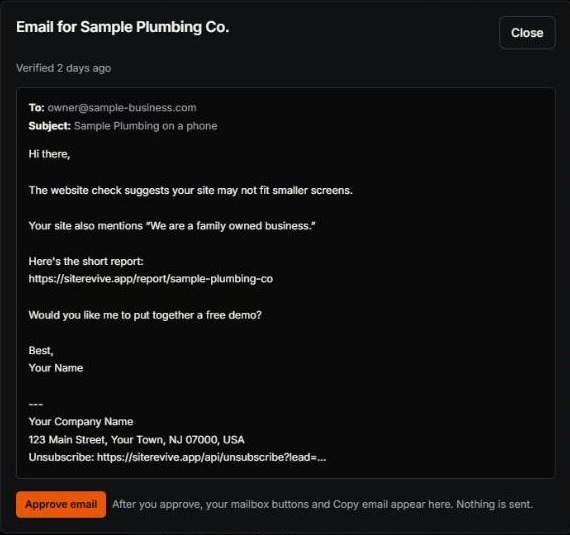
- On Find Leads, under the business, click Review email.
- Read To and Subject. Is this the right owner? Is the subject plain?
- Read the whole message, out loud if you can.
- Cut any line you cannot see for yourself on their website or in the report.
Step 2. Fix it until it sounds like you
Read each line and ask two questions.
- Is it true? Can you see it in the report, and on the website? If not, cut it.
- Would I say it to this owner on the phone? If not, change the words.
Keep it short. One problem. One question. Do not promise results. You cannot control what an owner does next, and neither can I.
| Cut this | Say this instead |
|---|---|
| “I can get you more customers.” | “When I opened your site on my phone, I had to zoom to read it.” (Say only what you saw.) |
| “Your website is terrible.” | “Here is one thing I noticed. Here is a short report about it.” |
| “We are a full-service digital agency.” | “I build websites for local businesses.” |
Step 3. Check the link and the bottom
- Click the report link in the message. Does the page open?
- Look at the bottom. You should see your name, your business, your mailing address and a way to unsubscribe.
- No address, or no email at all? Go back to chapter 1 and fix Settings. SiteRevive will not prepare an email without your address.
Step 4. Approve, open, read, send
- Click Approve email.
- Choose Open in Gmail, Open in Outlook or Copy email. The first two open a new message in your own mailbox. If you use another mailbox, copy the email and paste it in.
- Read it one last time in your own mailbox.
- Press Send yourself.
A draft in your own mailbox, with the owner’s address, the subject, your message and your details at the bottom. SiteRevive does not send it. It does not even connect to your mailbox.
Before you press Send: the checklist
- The owner’s email is on their own website. I checked with View source.
- I can see the problem myself.
- The message says one thing, not five.
- No promise of replies, clients or results.
- The report link opens.
- My name, business and address are at the bottom, with a way to unsubscribe.
- It sounds like me.
- If anyone ever asks me to stop, I will not write to them again.
- I read it in my own mailbox once more.
Sending without opening the report link. A broken link is the fastest way to look careless.
Sending a draft you did not read. It goes out under your name.
Leaving in a claim you cannot back up. Cut it.
Sending a lot on day one. Send one. See how it goes. Then do more.
Check yourself
- I clicked Review email and read all of it.
- I fixed anything I would not say.
- I sent it from my own inbox, myself.
That is your first email. Next: what to do when an owner writes back.