11. Plan your weeks and your numbers
A plan is a guess you keep improving. This chapter gives you a worksheet. You fill in your own numbers. Nothing here is a result, a promise or a typical outcome.
I cannot tell you how many emails it takes to get a client. It depends on your town, your kind of business, your emails, your sample sites and some luck. Some weeks you will get nothing. Some people will not get a client at all. Results vary, and many people will have weeks that feel like failure. So the only numbers that matter are the ones you count yourself. Count for a few weeks. Then plan.
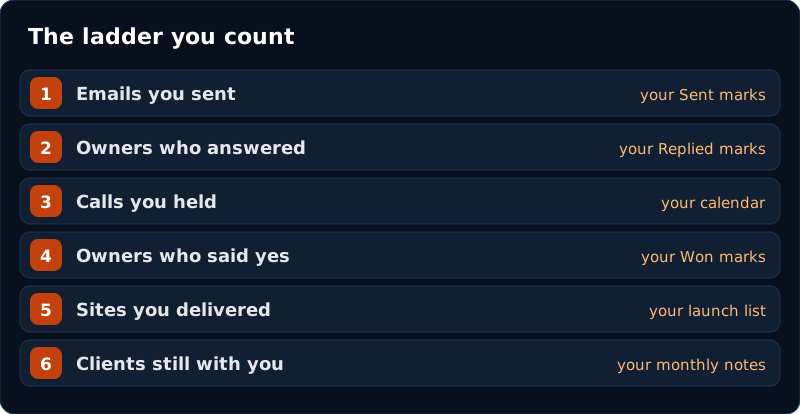
The ladder
Every client climbs the same steps. You count each one. Steps 1, 2 and 4 are already in Manage Leads. Step 3 is in your calendar.
| Step | Where you count it |
|---|---|
| 1. Emails you sent | Your own tally, from each Sent mark |
| 2. Owners who answered | Your own tally, from each Replied mark, plus anyone who tapped the report button |
| 3. Calls you held | Your calendar |
| 4. Owners who said yes | Your own tally, from each Won mark |
| 5. Sites you delivered | Your launch list from chapter 9 |
| 6. Clients still with you | Your monthly note list |
Keep your own tally on Sheet C as you go, each day or each week. Manage Leads shows only the latest mark for each business, so do not add it up at the end. Answered means owners who wrote back with interest or a question. Count No thanks in its own column. They are not failures. They are answers, and they tell you which businesses to skip.
Worked backwards, with made-up numbers
Start with what you want. Then ask what each step would have to be. This table is an example only. The numbers are invented to show the method. Do not copy them. Do not expect them.
| Step, from the end | Example (made up) | Yours |
|---|---|---|
| New clients I want this month | 1 | |
| Calls I would need | 4, if 1 call in 4 ended in a yes | |
| Owners who would need to answer | 12, if 1 answer in 3 became a call | |
| Emails I would need to send | 240, if 1 email in 20 got an answer |
These ratios are not what to expect. Many people will see lower ones. Some will not get a client at all. The “if” parts are guesses. They are the part you replace. After a few weeks you will have your own counts. Write them in the last column, as “1 in ___”, and the number you need. Throw mine away.
It does not show what will happen to you. It shows how a number at the top turns into smaller steps you can count. And if the bottom number is more than you can do well, the target is too big for now. Lower it, or give it more weeks.
Checking a money goal against your counts
Use your own prices from chapters 8 and 9. Do not borrow anyone else’s.
- Write the one-time price for a website: ______
- Write the monthly price for your care plan, if you offer one: ______
- Write how much money you would like each month: ______
- Divide: money I want each month, after tool costs ÷ what one new client pays me = new clients I need that month.
- Compare with your count from the ladder. Is it a stretch, or out of reach?
A monthly care plan changes the shape of the math. A one-time price pays once. A monthly price is charged again each month the client chooses to stay. That is not a promise that anyone will stay. It is why the small habits in chapter 9 are worth doing.
What it really costs you
A price is not what you keep. Fill in your own costs once a month.
- Tools you pay for. Write each one, and what it costs per month.
- Hours. Write down how long each client really took. A note on your phone is enough.
- Your lowest hourly number. Decide, before you look at any client, the lowest hourly amount you would accept from a stranger. If a client falls below it, change the scope, or say no.
The sum is simple: (what they paid you − tool costs) ÷ hours = what each hour paid you. Do the brackets first. Count before tax and fees. Hours include calls, building, changes and notes. It projects nothing. It only tells you the truth about last month.
A simple four-week plan
| Week | Do this |
|---|---|
| 1 | Chapters 1 to 5. Run a small search. Read the reports. Send your first email, checked and sent by you. Mark it Sent. |
| 2 | Send a small batch you can answer in one day. Check your inbox every day. Answer the same day. Mark every one. |
| 3 | Follow up, at most three times each. If owners reply, build a sample for anyone who asks and hold your calls. If not, send more and follow up. |
| 4 | Fill in the ladder. Find the step where the most people drop out. If you have only a handful so far, keep counting. Then change one thing there and start again. |
Where did it stop? Change one thing.
| You see this | Look at this first |
|---|---|
| Emails sent, almost no answers | With only a few emails this is normal. Send more and wait a week or two before you decide. Then look at the business and the problem you picked. Is it easy to see in ten seconds? Is the email short and plain? |
| Answers, but few calls | How fast and how simply you answered. Did you ask for a short call? |
| Calls, but few yeses | Chapter 8. The sample. The way you said the price. Did you give them a way out? |
| Yeses, but unhappy clients | Chapter 9. The one-page agreement, the dates, and the monthly note. |
Change one thing. Wait a week or two. Count again. If you change five things at once, you will not know which one helped.
Setting a big target and quitting when week one is quiet. Count first. Then aim.
Copying someone else’s ratios. They are not yours.
Not counting. If you do not count, you cannot improve.
Hiding a bad week. A zero is data. Write it down.
Check yourself
- I know the six steps of the ladder, and where I count each one.
- I filled in my own column of the worksheet, not just the example.
- I know my price, and my lowest hourly number.
- I will change one thing at a time.
Sheets to print
Print these, or copy the columns into a spreadsheet. Fill them in by hand, week by week. Sheets A and B are on the Empty Week Fix page.
Sheet C. Your weekly ladder
| Week | Searches run | Emails sent | Answered | No thanks | Calls held | Yes (Won) | What I changed |
|---|---|---|---|---|---|---|---|
| 1 | |||||||
| 2 | |||||||
| 3 | |||||||
| 4 | |||||||
| 5 | |||||||
| 6 | |||||||
| 7 | |||||||
| 8 | |||||||
| 9 | |||||||
| 10 | |||||||
| 11 | |||||||
| 12 |
Sheet D. Your costs and hours, each client
| Client | Month | What they paid you | Tool costs | Hours | What each hour paid = (paid − tools) ÷ hours |
|---|---|---|---|---|---|
Next: the tools and links I use, and where to go from here.