12. Tools and links
You do not need many tools to do everything in chapters 1 to 9. This page lists what each one is for, what is optional, and where to find me.
A note on links
The GoHighLevel link below is an affiliate link. I may earn a commission if you use this link. You do not need it for chapters 1 to 9. Every other link on this page is plain, with no commission.
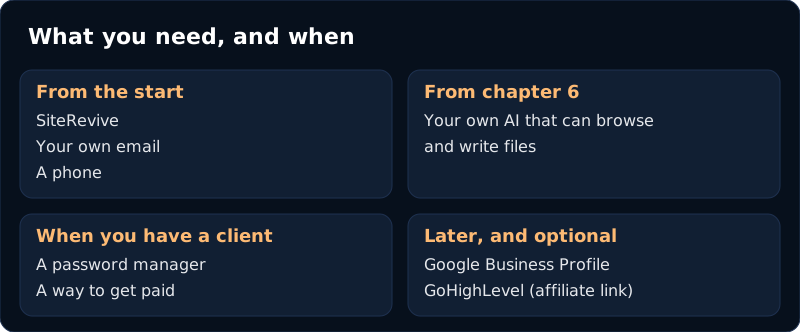
What you need, and what you can skip
| Tool | What it is for | Need it? |
|---|---|---|
| SiteRevive | Finds local businesses, checks their websites, makes the report, and drafts the first email. It sends nothing. | The core of this guide |
| Your own email | Where you send from and read replies. Gmail, Outlook or another one. | Yes |
| Your own AI | Builds the sample website, and can write drafts. Use one that can browse the web and write files. Claude is the one we test with. | Yes, from chapter 6 |
| A phone | To check every site and every sample the way an owner will see it. | Yes |
| A spreadsheet or printed sheets | For your list, your weekly counts and your costs. The sheets in chapter 11 are enough. | Yes |
| A password manager | If an owner insists on giving you a password, it goes here. Never in an email. | Yes, when you have a client |
| A way to get paid | You choose it. Agree how and when before you start (chapter 9). | Yes, when you have a client |
| Google Business Profile | The listing owners show on Google and Maps. You check it, and later you help fix it (chapter 10). | Free, when you add services |
| GoHighLevel | One place for texts, forms, calendars and a shared inbox. The phone, fast-reply and review services in chapter 10 can be built in it. | Optional, and only later |
The links
- SiteRevive: siterevive.app
- Google Business Profile: google.com/business
- GoHighLevel (affiliate link): gohighlevel.com. I may earn a commission if you use this link.
- The Empty Week Fix, a free page with two sheets you can print: siterevive.app/wp/empty-week-fix.html
Where to find me
- YouTube: @ryanshawme
- Instagram: @ryanmarketingai
- TikTok: @ryanshawme
- My main site: ryanshaw.xyz. Some of what is there is paid. You do not need any of it to use this guide.
- A free community: AI Agency in a Box, Free. Part of it is free. The rest of that program is a separate paid course, and SiteRevive is separate software. You can use this whole guide without either.
- Questions: improveddigital@gmail.com
Where to go from here
- Do chapters 1 to 5 once, with one business. Send one email that you read, fix and send yourself.
- Answer every reply the same day (chapter 6). Mark everything (chapter 7).
- Count your numbers for a few weeks (chapter 11). Change one thing at a time.
- When owners reply, use chapter 8. When one says yes, use chapter 9. Add a service only when they tell you what is eating their week (chapter 10).
I update this guide when the app changes. If something here does not match what you see on your screen, tell me at the email above and I will fix it.
Ryan