How to Contact a Business With No Email Address (30 of 100 Had None)
 By Ryan Shaw. Published . 6 min read.
Key takeaways
- In our New Jersey data, 30 of the top 100 leads had no email we could find on their own site. Plan for them from day one.
- Reach a no-email business by phone, by letter or in person. Each takes more time than email, so use them on your best leads.
- Never guess an email address like info@ or the owner's first name at the domain. A wrong guess reaches a stranger.
- Lead with one true thing you saw and a link they can open on a phone. Keep letters to a few lines.
- Phone and mail follow different rules from email. Check your state's rules. This is not legal advice.
On this page
To contact a business with no email address, use the phone number on its website or Google listing, send a short letter to its street address, or visit at a quiet hour. Do not guess an email. In our New Jersey data, this is not a rare case: 30 of the top 100 leads had no email we could find on their own site (SiteRevive data, October 2026). If you sell websites, a third of your best-looking leads may need a different route.
This post shows the three routes, what to say on each, and the traps. It is practical advice from someone who ran a marketing agency for 15 years, not a legal opinion.
How common is a business with no email?
Here is the contact picture for the 100 highest-ranked leads in our New Jersey data. The 100 were picked from 637 businesses found in 11 searches (SiteRevive data, October 2026, New Jersey).
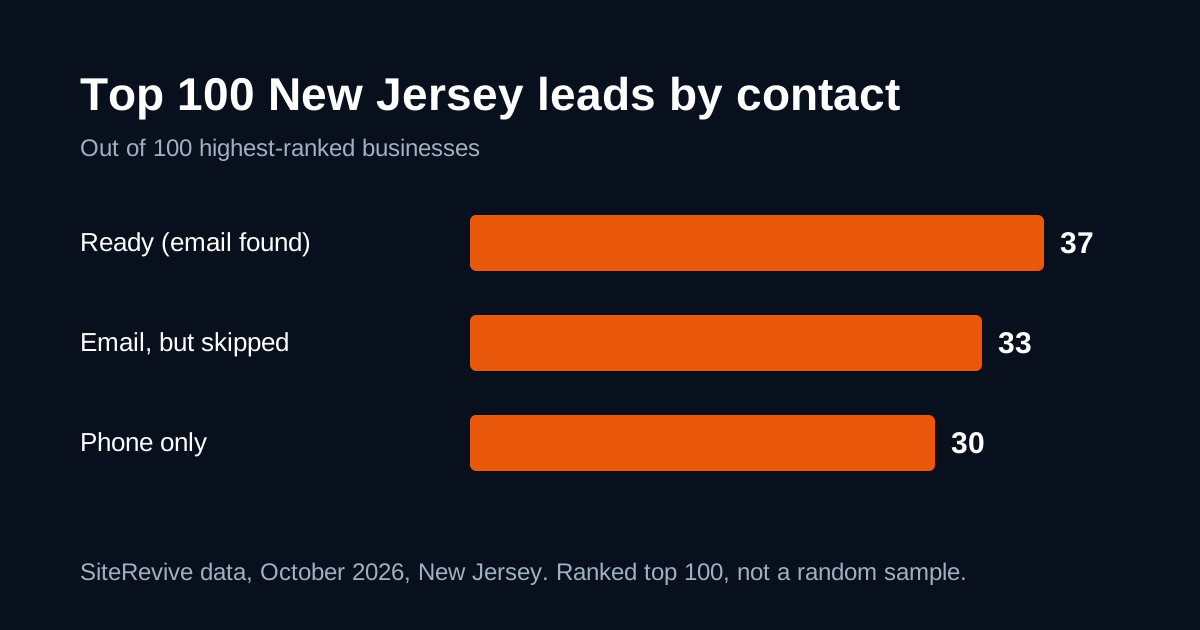
| Group | Count | What it means |
|---|---|---|
| Ready | 37 | Own website, an email found on that website, problems checked |
| Email, but skipped | 33 | An email was found, but the app left the business out |
| Phone only | 30 | No email found on the business's own site |
Of the 70 with an email, 25 used a free mailbox such as Gmail, AOL, Outlook or Yahoo. Another 23 of the 100 had no website at all, and those are counted inside the groups above. Our full New Jersey breakdown explains the method and the limits. The most important limit: this is a ranked top 100, not a random sample, so do not read it as a rate for the whole state.
Why would a busy business not list an email? Reasons I would guess, and it is a guess: the owner runs everything from a mobile phone, customers call, and a public inbox only brings spam. None of that makes them poor leads.
Rule one: never guess
It is tempting to try info@ or the owner's first name at the domain. Do not.
- A wrong address may reach a stranger, who did not ask to hear from you.
- A bounce hurts the reputation of your sending account.
- You cannot tell a business owner where you got the address.
SiteRevive keeps an email only if it finds it written on the business's own website, and never guesses one. Do the same by hand. The guide to finding a business owner's email address shows the honest places to look: the contact page, the footer, the Google listing and the owner's own pages.
If it is not written down anywhere public, treat the business as phone only.
Route 1: Call
A call is the fastest way to reach a phone-only business, and probably the one they expect.
When to call. Not at meal times for a restaurant, and not first thing for a trade in the field. Pick a quiet hour. If someone is busy, say you will try again and do.
What to say. Keep it under 30 seconds:
Hi, is this [Business]? My name is [Name]. I'm a local web designer.
I looked at your website on my phone and noticed [one real thing].
I made a free sample of how it could look. May I send you the
link? Who should I send it to?
Then stop talking. If they give an email, write it down and use it. If they say no, thank them and note it so you never call again.
Do not read a script in a flat voice. Do not argue. The point of the call is to get a name and permission, not to sell. Our guide to first sales calls has more on tone.
Route 2: Send a letter
A letter is slower. It is also unusual enough to get opened. Keep it to a few lines on one page:
[Business name]
[Street address]

Dear [Owner or "Owner"],

When I opened your website on my phone, [one real thing: the menu
needed pinching / the phone number was not a button].

I built a free sample of a fixed version. It is not live and
nothing is needed from you. To see it on your phone, type this
address: [short link]

If you would rather I not contact you again, tell me and I will
stop.

[Your name]
[Your business, address, phone]
Three tips:
- Use a short link you can read out loud. A long address in a letter gets mistyped. Keep the sample out of search with a noindex rule, as in our post on fair sample sites.
- Say what it is, who you are and how to reach you. Plain beats clever.
- Mail only your best leads. Print and postage cost money, and nobody can promise a reply.
Do not mark the envelope as urgent or official. Do not imply you are a customer or a government office.
Route 3: Visit
A visit works best for a shop, a salon or a restaurant, where someone is standing at a counter. Go at a quiet hour. Bring one printed page: the sample on a phone screen or a small card with the link. Ask for the owner or manager by name if you have it. Leave when they say they are busy.
I would not try this on a business that works from a truck or a home office. Respect people's homes.
Route 4: A contact form on their site
If the site has a contact form, using it is fair. Keep the message short and honest, with the same one real observation and a link. It goes to the business's own inbox, and a reply gives you an email address you may use.
What about social messages?
A message through a business's own Facebook or Instagram page is possible. I would use it last. Read the platform's rules first, because automated or repeated messages can get an account restricted. One short message from a real person, once, is the most you should send.
Which route for which lead?
| Situation | Route |
|---|---|
| Phone number on listing, quiet hours known | Call first |
| Street address, a business that is clearly open, no phone answer | Letter |
| Shop or restaurant near you | Visit at a quiet hour |
| Site has a contact form | Form, once |
| Nothing public except a social page | Skip, or one short message |
Match the effort to the lead. A phone-only business with a 2010 footer, a security warning and 4.9 stars is worth a stamp. A closed or doubtful business is not. Confirm the right business first: our guide to confirming the right business before you pitch covers it.
Rules and limits
CAN-SPAM, the law the FTC explains for business, covers commercial email. Phone calls and postal mail fall under other rules that vary, so check what applies where you work. Whatever the route, keep a do-not-contact list and honor it. Our guide on whether cold email is legal for web designers has the email side.
Honest limits of the data above: it is one account, 11 searches and one state. A phone-only business is not a hot lead because it has no email. It is a business that needs a different first move.
Where SiteRevive fits
SiteRevive finds local businesses, checks each website and writes down the real problems. It keeps an email only if it finds one on the business's own website, and it marks the rest as phone only so you know to call or write. It does not promise replies, calls or sales.
Plans start at $97 a month, with a 7-day money-back guarantee, no questions asked. Details are on the SiteRevive pricing page. For the whole outreach picture, including the email route, see how to start a website agency with AI.
Questions people ask
How do you contact a business that has no email address?
Call the number on its website or Google listing, mail a short letter to its street address, or stop by at a quiet hour. A contact form on its own website also works if it has one. Do not guess an email address.
Why do some businesses not list an email?
Many owners prefer the phone, run the business from a mobile and never set up a public mailbox, or hide the address to avoid spam. In our data, 30 of 100 top-ranked New Jersey leads had no email on their own site.
Is it okay to guess a business email address?
No. A guess like info@ or an owner's name at the domain can reach the wrong person or bounce. SiteRevive keeps an email only if it finds it on the business's own website, and never guesses one.
Does CAN-SPAM apply to letters and phone calls?
The CAN-SPAM Act covers commercial email. Letters and calls fall under other rules that vary. Check the rules that apply where you work, keep a list of anyone who asks you to stop, and honor it.
Sources
- CAN-SPAM Act: A Compliance Guide for Business (FTC), read October 21, 2026.
Ryan Shaw
Ryan Shaw makes SiteRevive. He ran a marketing agency for 15 years and worked with 100+ agency clients. He has generated $100M+ in online sales, most of it through agency clients, and has helped 15,000+ marketers with software, courses and coaching.
Earnings disclaimer. SiteRevive and this article do not promise income, sales or replies. What you earn, if anything, depends on your work, your market and your offer. Results vary and some people earn nothing.