Old Copyright Year on a Website: What It Does and Does Not Prove
 By Ryan Shaw. Published . 5 min read.
Key takeaways
- An old footer year was the most common problem in our New Jersey data: 25 of 37 checked sites, with years from 2010 to 2024.
- It does not affect who owns the work. The U.S. Copyright Office says a notice is optional for works published since March 1, 1989.
- It does signal neglect to visitors. Treat it as a hint, never as proof the site is broken.
- A current year proves nothing either, because many templates fill the year in automatically.
- The fix takes a minute: show a range such as 2016 to the current year, or let the page fill in the year itself.
On this page
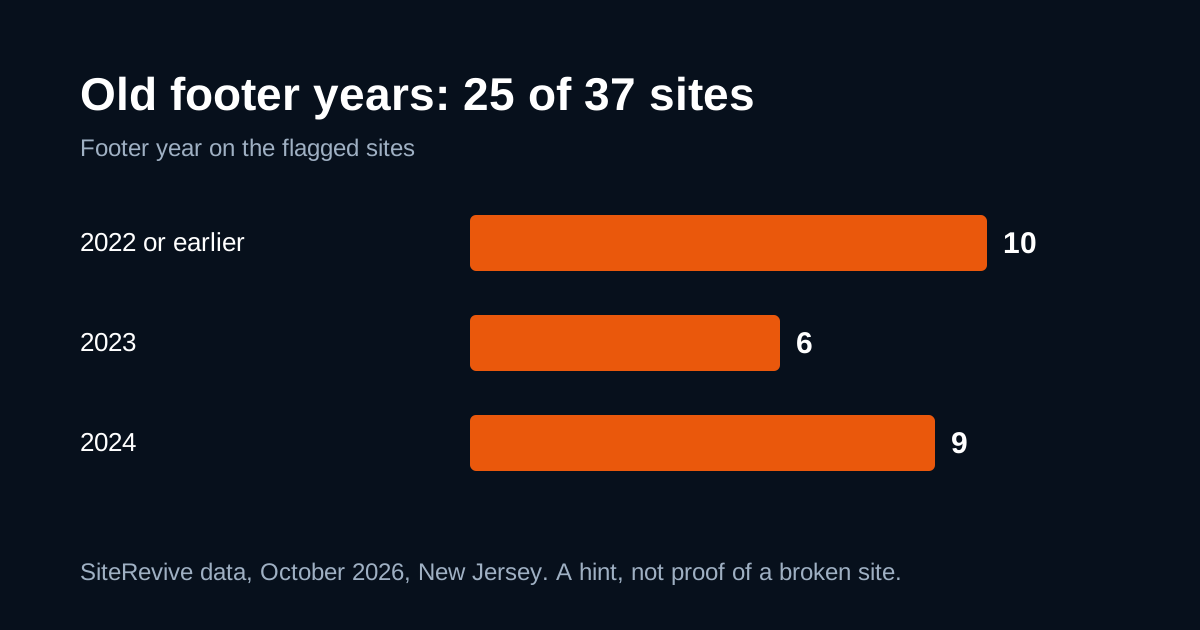
An old copyright year in a website footer is a hint that nobody has touched the site in a while. It does not change who owns the work, and it does not prove the site is broken. It was still the most common problem in our New Jersey data: on 25 of 37 fully checked sites, the footer year was out of date (SiteRevive data, October 2026, New Jersey). This post covers what the year means, what it does not mean, how to fix it, and why you should never write a cold email about it alone.
What our data shows
In October 2026 we looked at the 37 New Jersey business sites that SiteRevive had checked in full. They came from the top 100 of 637 businesses found in 11 searches. The footer year on the 25 flagged sites ranged from 2010 to 2024 (SiteRevive data, October 2026, New Jersey).
| Footer year | Sites |
|---|---|
| 2022 or earlier | 10 |
| 2023 | 6 |
| 2024 | 9 |
A 2024 footer in late 2026 is a small thing. A 2010 footer is a different thing. The sample restaurant site we built in October 2026 (name hidden) showed 2016, along with a menu in PDF files and a site that did not load over a secure connection. See the full New Jersey study for method and limits. In short: the 37 were ranked, not random, so the counts lean high for the whole state.
What an old year does not prove
It does not take away ownership. The U.S. Copyright Office explains in Circular 3 that, for works first published on or after March 1, 1989, a copyright notice is optional. Copyright exists when the work is created. The Office still encourages a notice, and says it has legal benefits, but a stale year does not undo anything. If the legal side matters to you, ask a lawyer. This is not legal advice.
It does not prove the site is broken. Plenty of old footers sit on pages that load fast and work well. Check the rest of the page before you decide anything.
It does not tell you the business is closed. A business can be busy and never open its website. That is common among owners who work in the field all day.
What an old year does show
It shows what a visitor will think. If you land on a page that says 2016 and it is now 2026, you wonder whether the hours, the menu and the phone number are current too. That worry is the real cost. It is my opinion, not a measured result, but I believe visitors read the footer more than owners expect.
It is also a cheap clue for someone who checks websites. If the footer is old, look at the rest of the page for more. An old year can go with old technology, unchanged text or a missing secure connection. Our 10-minute checklist for outdated websites shows the other checks in order.
A current year proves nothing either
Many site templates write the current year into the footer for you. A site with this year in the footer may still have a 2019 menu and a dead contact form. So treat the footer as one-way evidence. An old year raises a question. A current year does not answer it.
How to find the footer year
- Open the site on a computer and scroll to the bottom.
- Look for the copyright symbol and a year, or press Ctrl+F and search for the symbol.
- Write down the year, the page and the date you looked.
- Check one inner page too. Some sites have a different footer on the home page.
Keep that note. If you decide to write to the owner, the note is your evidence.
How to fix an old year
For an owner, there are three fixes, easiest first:
- Use the year setting in your site builder if it has one. Many themes and builders let you type a year or choose "current year."
- Show a range. Write the year the site first went up, then the current year, for example "2016 to 2026" with your business name. It keeps the start date and looks maintained.
- Fill it in automatically. A small piece of code writes the year when the page loads:
<p>© <span id="y"></span> Your Business Name</p>
<script>
document.getElementById("y").textContent = new Date().getFullYear();
</script>After the fix, look at the rest of the site. A new footer on an old page only hides the problem.
Should you email a business about it?
Not by itself. A footer year is too weak to lead with. In our post on the cold email with a finished sample, the rule is to name one real problem that the owner can see for themselves, such as a security warning or a menu link that fails. Chrome has labeled every plain http page "not secure" since version 68, as the Chromium Blog announced in 2018. That is something an owner can check in a second.
If the footer year is your only finding, ask whether the business is worth contacting at all. Good reviews with a weak site is the better signal, and in our data it was common: the 37 checked businesses had a median Google rating of 4.9 (SiteRevive data, October 2026, New Jersey).
When you do write, be kind. "I noticed the footer says 2016" can sound like an insult. "I looked at your site on my phone and the menu was hard to read" is better. For a longer review that you can show to an owner, use a website audit checklist.
Where SiteRevive fits
SiteRevive finds local businesses, reads each website's text and records old dates among the problems it writes down, next to security, phone and search basics. You choose who to contact. It does not promise replies or sales.
Plans start at $97 a month, with a 7-day money-back guarantee, no questions asked. See the SiteRevive pricing page. The check by hand is free, and the two-minute check for leads with bad websites shows you how.
Questions people ask
Does an outdated copyright year hurt a website?
Not legally. The U.S. Copyright Office says a copyright notice is optional for works first published on or after March 1, 1989. It can hurt trust, because visitors read an old year as a sign that nobody maintains the site.
Should the copyright year be the current year?
Many sites show a range, from the year the site first went up to the current year, for example 2016 to 2026. That keeps the start date and looks maintained. Ask a lawyer if the exact form matters for you.
How do I update the year automatically?
Use your site builder's current-year setting if it has one, or add a line of JavaScript or server code that writes the current year into the footer. Then you never need to edit it again.
Is an old copyright year a good reason to cold email a business?
On its own, no. It is a weak hint. Look for a second real problem a customer would notice, such as a security warning or a menu that does not work, and lead with that.
Sources
- Copyright Notice (Circular 3, U.S. Copyright Office), read October 21, 2026.
- A secure web is here to stay, Chromium Blog (February 8, 2018), read October 21, 2026.
Ryan Shaw
Ryan Shaw makes SiteRevive. He ran a marketing agency for 15 years and worked with 100+ agency clients. He has generated $100M+ in online sales, most of it through agency clients, and has helped 15,000+ marketers with software, courses and coaching.
Earnings disclaimer. SiteRevive and this article do not promise income, sales or replies. What you earn, if anything, depends on your work, your market and your offer. Results vary and some people earn nothing.